.svg)
How many internal links per page SEO: best practices (2026)

In the evolving world of Search Engine Optimization (SEO) for 2026, one question keeps coming up for webmasters and content strategists: "How many internal links per page for SEO is optimal?" The answer has changed dramatically from the rigid rules of the early web to a more thoughtful, user-focused approach. Back in the day, Google recommended limiting links to 100 per page, a guideline created for technical crawling limitations that don't exist anymore. Today, the focus has shifted entirely toward relevance, user experience, and logical site architecture.
When I started working on large content sites, the question was never how many internal links to add, but which ones actually help users and search engines understand the page. In practice, obsessing over a fixed number is usually a sign the strategy is missing the bigger picture.
Key takeaways about internal links for SEO
- There's no hard limit for internal links per page anymore, but a practical guideline is 4 contextual links per 1,000 words with a maximum of 150 total links per page to preserve link equity and crawl budget efficiency.
- Semantic relevance matters more than quantity—links should connect topically related content, with contextual links in body text carrying more SEO weight than those in navigation or footers.
- A flat site architecture following the 3-click rule (any important page accessible within three clicks from homepage) optimizes both user experience and search engine crawlability.
- Regular quarterly audits are essential to fix broken links, eliminate redirect chains, and rescue orphan pages, directly improving your site's crawl efficiency and overall SEO performance.
What are internal links and why this is important?
Internal links are hyperlinks that point from one page on a domain to another page on the same domain. While they may look like simple navigational elements, they're the fundamental wires that connect your website's architecture. From a technical SEO perspective, internal links serve three critical functions: making website navigation easier for users, defining the hierarchy and structure of a website, and distributing page authority (link equity) throughout the site.
There are several types of internal links that play distinct roles in site architecture and user experience:
- Navigational links: These are typically found in menus, headers, footers, and sidebars, guiding users to main sections or pages of the website.
- Contextual links: Embedded within the body content, these links connect semantically related pages to provide additional information or related resources.
- Bookmark links: also known as "anchor links", these enable users to jump to specific sections within the same page, enhancing navigation within long-form content.
- Other types: Lists, related articles, breadcrumb trails, and call-to-action links also contribute to internal linking by helping users and search engines understand site hierarchy and flow.
.png)
Each type supports both usability and SEO but differs in the weight and value passed to linked pages.
The Mechanics of Link Equity and Crawlability
Search engines like Google use "spiders" or bots to crawl the web. These bots follow links to discover new content. If a page lacks internal links pointing to it, it becomes an "orphan page," making it nearly impossible for search engines to find and index. Plus, internal links act as pathways for "link juice"—the value passed from one page to another. A high-authority page (like a homepage) can pass authority to deeper, newer pages via strategic internal linking, directly influencing their ability to rank in search engine results pages (SERPs) and AI search engines.
User Experience and Engagement Metrics
Beyond technical crawling, internal links significantly impact user experience (UX). They guide visitors through a logical journey, moving them from broad informational topics to specific transactional pages. This movement increases the average time on site and pages per session while decreasing bounce rates—signals that Google interprets as indicators of a high-quality, relevant website.
Quantifiable Impact
Data suggests that a robust internal linking structure can improve crawling efficiency by up to 40% for large websites. When bots can traverse a site without hitting dead ends or excessive depth, the "crawl budget"—the number of pages a bot crawls on your site during a given timeframe—is used more effectively. This makes sure that your most important content is indexed faster and updated more frequently in search results.
Determining the optimal number of internal links per page SEO
While modern search engines can process thousands of links per page, sticking to a strategic limit is crucial for preserving the value of those links and maintaining a clean user interface.
Debunking the "magic number" myth
For years, the SEO industry stuck to the "100 links per page" rule. This figure came from a technical recommendation by Google in the early 2000s, primarily to prevent crawler timeouts on slow connections.
In 2026, the idea of a hard limit for internal links is simply outdated. Google has been very clear on this: there is no fixed number of links that triggers a penalty. What matters is whether those links actually make sense for users.
However, the myth persists because it offers a sense of control. The reality is that the "magic number" is contextual.
A comprehensive pillar page of 4,000 words can naturally support significantly more internal links than a 500-word blog post. Focusing on a rigid arbitrary number often leads to forced, unnatural linking that hurts the user experience. The goal isn't to hit a quota, but to provide value. If a link helps the user understand the topic better or navigate to a related service, it belongs there. If it's added solely to manipulate link juice, it's likely detrimental.
General guidelines for content length and link density (e.g., 4 per 1000 words)
While there's no universal law, we need actionable baselines to scale internal linking operations effectively. For beginners and automated systems, we recommend a density-based approach.
A safe, effective starting point is approximately 4 contextual internal links per 1,000 words of body content. This ratio makes sure that links are sparse enough to stand out but frequent enough to provide necessary context.
The Practical Limit: When Too Many Links Become Detrimental (e.g., 150 links maximum)
Despite the lack of a hard technical cap, we advise a practical limit of 150 total links per page (including navigation, footer, and body links). When the link count goes beyond this threshold, the value passed through each individual link (link equity) becomes negligible. Imagine pouring a gallon of water into 150 cups versus 5 cups; the more cups you fill, the less water each one receives.
Furthermore, excessive links—specifically in the range of 300 to 600+—can become detrimental. At this volume, you risk wasting crawl budget. Search engine bots may abandon the page before crawling every link, or worse, flag the page as "link spam" or a "link farm," which can result in algorithmic devaluation.
Factors influencing the ideal link count
Several variables dictate whether you should lean towards the lower or higher end of the link density spectrum:
- Page Purpose and Intent:
- Navigational Pages (Home, Category): These naturally require a higher volume of links to direct traffic to sub-pages.
- Transactional Pages (Product, Checkout): These should have minimal internal links (often near zero in the main content) to keep the user focused on conversion.
- Informational Pages (Blog Posts): These benefit most from the 4/1000 rule to encourage exploration.
- Mobile Responsiveness: On mobile devices, screen real estate is limited. A paragraph saturated with hyperlinks can lead to "fat finger" errors, where users accidentally click the wrong link. This degrades the user experience and can negatively impact Core Web Vitals scores related to visual stability and interactivity.
- Crawl Depth: Pages deeper in the site architecture (e.g., 4+ clicks from the homepage) may need more aggressive internal linking from higher-authority pages to make sure they receive sufficient link equity to rank.
Building an effective internal linking strategy
In addition to the fundamental approaches outlined earlier, here are more didactic internal linking strategies designed to maximize SEO and user engagement:
Point internal links from traffic pages to conversion pages
Many companies invest in creating high-traffic blog content that attracts visitors looking for information. However, these blog posts often have lower conversion rates. By strategically linking from these popular informational pages to landing pages or product pages optimized for conversions, you can guide users along the funnel and increase sales or leads. This method ensures your valuable traffic leads to desired actions.
On conversion-focused pages, I usually recommend being extremely selective with internal links. Every extra link is a potential distraction, and at that stage, focus matters more than exploration.
Building link value with high-authority pages and topic clusters
The "Topic Cluster" model is the gold standard for modern internal linking. This strategy involves creating a central pillar page that broadly covers a core topic (e.g., "Digital Marketing") and linking it to multiple cluster pages that cover specific subtopics in depth (e.g., "SEO," "PPC," "Content Strategy").
- Pillar page: Links out to all cluster pages.
- Cluster pages: Link back to the pillar page and to each other.

This interlinking structure creates a dense web of relevance. When one page in the cluster performs well and gains backlinks, that authority flows through the internal links to the entire cluster, boosting rankings for all related pages.
Identify your strongest "power pages"—those with high authority and the most external backlinks—and use internal links from these pages to pass equity to newer or lower-ranking content that needs a boost. This transfers link value effectively, lifting the visibility of less established pages and improving your overall site performance.
Link related posts to enhance topical depth
Within your blog or resource center, connect articles that cover complementary or sequential topics. This encourages users to explore multiple related pages, boosting session duration and signaling to search engines a comprehensive coverage of the subject, which can positively affect rankings.
Regularly refresh internal linking as content evolves
As you add or update pages, reassess existing internal links to ensure they still reflect current priorities and opportunities. Remove outdated links and add new ones to maintain a dynamic, strategically aligned link structure.
These strategies combined make your internal linking purposeful and results-driven, turning your website architecture into a powerful tool that guides visitors and search engines toward your highest-value pages.
A random distribution of links isn't a strategy. To maximize SEO performance, internal linking must be deliberate, prioritizing semantic connections and structural logic over simple keyword matching.
Prioritizing semantic relevance and contextual linking for user intent alignment
The most powerful internal links are those that connect semantically related concepts. Place internal links where they naturally fit the reader's intent within content—such as in-depth explanations, tutorials, or FAQs—guiding users to pages that match their current goals, whether information gathering or purchase decision. This improves user experience and conversion potential.
Also, search engines use Natural Language Processing (NLP) to understand the relationship between pages. A link from a page about "email marketing software" to a page about "newsletter templates" is highly relevant. A link from that same page to "office furniture" is not.
Contextual links—those embedded within the body paragraphs—carry significantly more weight than links in the footer or sidebar. Google assigns value based on the likelihood of a user clicking the link.
Pro Tip: A link placed prominently in the first 200 words of an article is often more valuable than one buried in the conclusion.
This is where technology bridges the gap between theory and execution.
Blym's SEO analysis identifies semantic terms and topic gaps within your content, pinpointing strategic internal linking opportunities that a human editor might miss. By analyzing the semantic vector of your content, our platform makes sure that every link strengthens the topical authority of your website, signaling to Google that you are a subject matter expert.
Optimizing anchor text for clarity and SEO
Anchor text—the clickable text in a hyperlink—tells search engines what the destination page is about. However, over-optimizing anchor text can trigger spam filters (specifically the Penguin algorithm updates).
Best Practices for Anchor Text:
- Descriptive and Natural: Avoid generic text like "click here." Instead, use "download the 2026 SEO guide."
- Variety is Key: Don't use the exact same keyword for every link pointing to a specific page. Use synonyms and long-tail variations.
- Relevance: The anchor text must accurately reflect the content of the target page. Misleading anchors increase bounce rates.
Anchor Text Distribution Target:
- Exact Match: 10-20% (e.g., "internal linking tool")
- Partial Match: 30-40% (e.g., "best practices for internal linking")
- Branded/Natural: 40-50% (e.g., "according to Blym," "read more")
Site architecture defines how link equity flows. A "flat" architecture is generally preferred over a "deep" one. The 3-click rule suggests that every important page on your website should be accessible within three clicks from the homepage.
- Homepage (Authority Source)
- Category/Pillar Page (Topic Hub)
- Sub-category/Article (Specific Content)
If a page is buried 5 or 6 clicks deep, search engine spiders may rarely reach it, and users will likely never find it. To fix this, use internal links from high-traffic pages to "lift" these deep pages closer to the surface. Breadcrumb navigation is also essential here, automatically creating a logical internal link trail that helps both users and bots understand the site hierarchy.
Advanced internal linking techniques
Once your foundational internal linking strategy is established, applying more sophisticated techniques can elevate both user experience and search rankings. Consider these approaches:
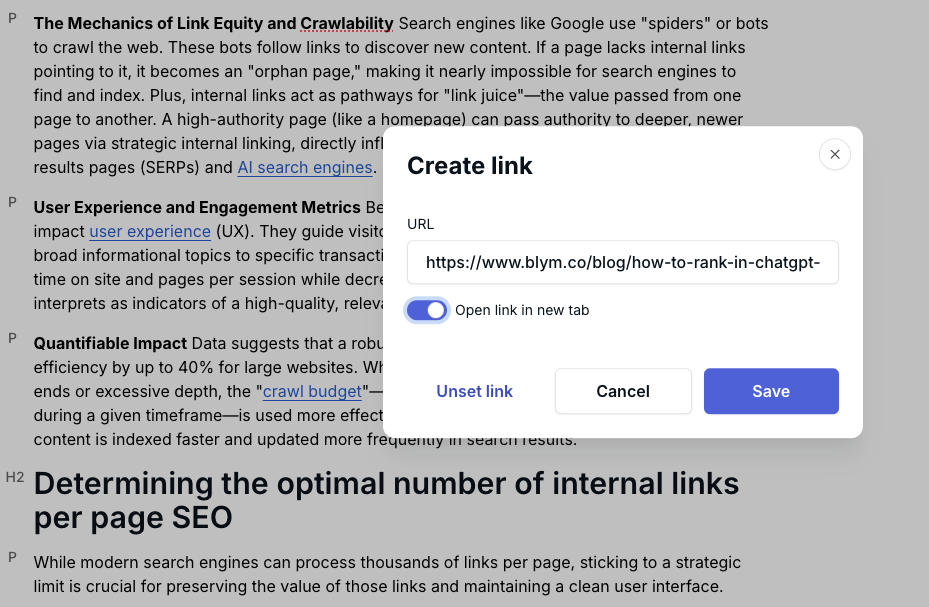
- Open contextual links in a new tab: Allow users to explore linked content without losing their place on the original page. This keeps the browsing context intact, making it easier for users to return and continue reading, especially useful when linking to additional information or related articles.
- Rotate anchor text variations: Incorporate different phrases and keyword forms in your internal links to avoid over-optimization and create a natural linking profile.
- Leverage long-tail keywords through internal linking: Support specific, less competitive keyword phrases by linking to pages targeting these terms, driving highly relevant traffic.
- Build a hub-and-spoke link structure: Organize your site around central “hub” pages that connect to related subpages, enhancing topical authority and simplifying navigation for both users and search engines.
- Enhance user journey with contextual links: Strategically place links that offer additional insights or related content, encouraging deeper exploration and reducing bounce rates.
Auditing and maintaining your internal link profile
Internal linking isn't a "set it and forget it" task. As you publish new content and remove old pages, your link profile evolves. Without regular maintenance, this evolution can lead to broken paths and wasted potential.
Tools for internal link analysis
To effectively manage your link profile, you need visibility into the data. Several industry-standard SEO tools provide the necessary metrics:
- Blym AI: Our proprietary AI-driven platform automates internal linking best practices, analyzing your site's semantic structure and optimizing link distribution for maximum SEO impact—all while preserving your brand voice and saving you time and effort.

- Google Search Console (GSC): The "Links" report shows exactly how many internal links point to each page on your site. This is the most accurate source of truth for how Google sees your structure.
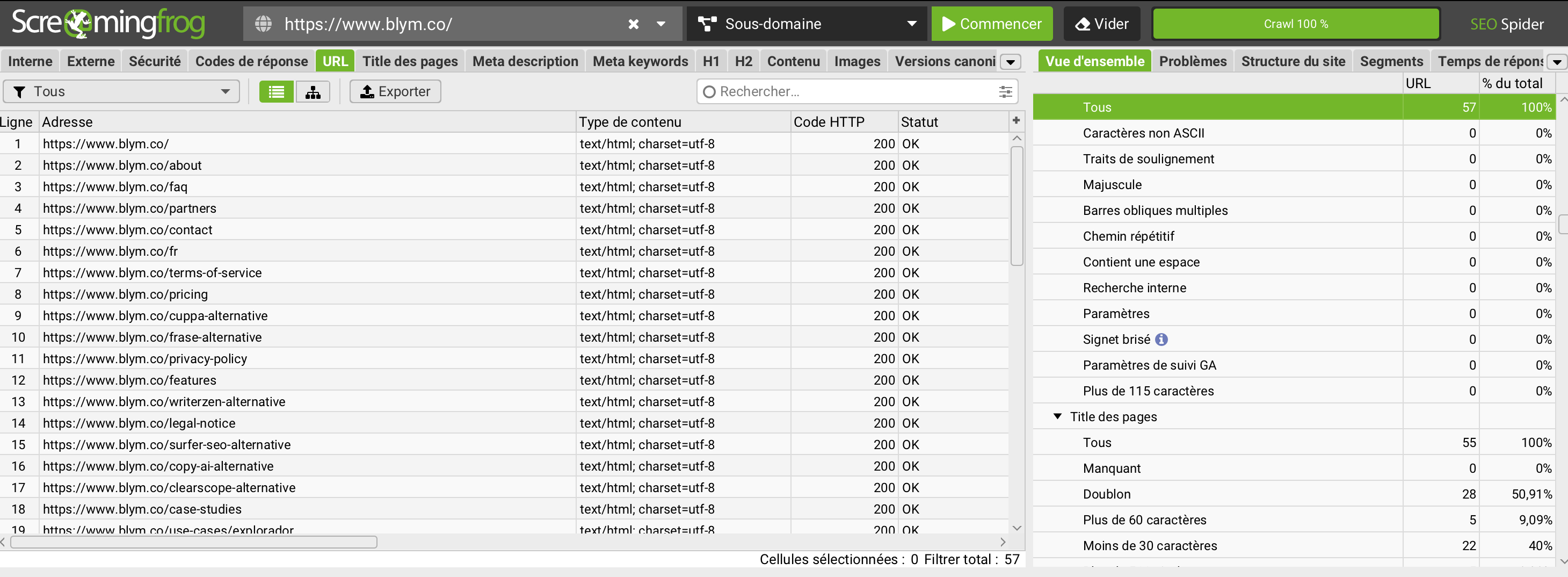
- Screaming Frog SEO Spider: A desktop crawler that is essential for identifying technical issues. It can visualize crawl depth and report on exact link counts per page.
- Ahrefs / SEMrush: These platforms offer "Site Audit" features that visualize internal link distribution, helping you identify pages with weak internal support (often called "weak pages").
Conducting regular internal link audits
We recommend conducting a full internal link audit quarterly. The audit process should focus on three primary issues:
- Fixing Broken Links (404s): Internal links pointing to non-existent pages are a dead end for crawlers and users. They waste crawl budget and degrade trust. Update these links to point to relevant, live content or remove them.

- Eliminating Redirect Chains: If Page A links to Page B, which redirects to Page C, you lose a small amount of link equity and increase load time. Update the link on Page A to point directly to Page C.
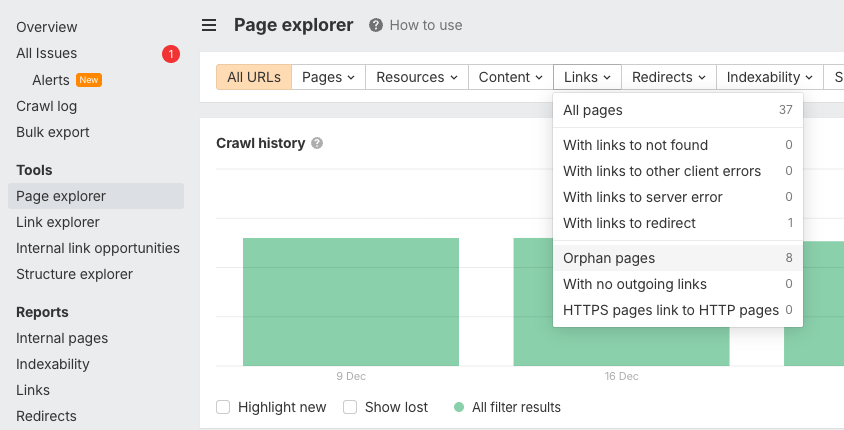
- Rescuing Orphan Pages: Identify pages with zero internal links. If the content is valuable, find relevant older posts and add links pointing to the orphan page. If the content is obsolete, consider deleting or redirecting it.
Internal linking is never ‘done’. Every new page you publish changes the balance of your site. Teams that audit links regularly consistently outperform those who treat architecture as a one-time task.
Monitoring the impact of internal linking on SEO performance
The success of your internal linking strategy should be measured by specific KPIs. After implementing changes—such as adding links to a new cluster or fixing broken paths—monitor the following metrics over a 4-8 week period:
- Page Authority (PA) or URL Rating (UR): An increase indicates better flow of equity.
- Organic Traffic: specifically to the pages you boosted with new internal links.
- Average Session Duration: An increase suggests users are following your internal paths.
- Crawl Stats: Check GSC to see if the "Pages Crawled per Day" metric increases, indicating better crawl efficiency.
Conclusion
Determining how many internal links per page to use is less about hitting a specific number and more about understanding the balance between technical efficiency and user value. While the "4 links per 1,000 words" rule provides a solid foundation for beginners, the ultimate goal is to build a semantic web that establishes authority and guides users effortlessly through your content. Remember the practical ceiling of 150 links to preserve crawl budget and link equity.
Implementing these best practices manually across hundreds or thousands of pages is a daunting task. This is where automation becomes a competitive advantage.
Blym automates internal linking best practices within a comprehensive SEO content creation workflow, making sure that every piece of content you publish is structurally optimized from day one. By using AI to manage the complexity of semantic connections, you can keep your site architecture robust, scalable, and primed for search engine dominance.
Frequently asked questions
How many internal links per page in SEO?
There is no strict limit, but a safe guideline is approximately 4 contextual links per 1,000 words of content.
What is the 80/20 rule in SEO?
In the context of internal linking, the 80/20 rule often suggests that 80% of your results come from 20% of your pages (your "power pages"). Strategically, you should focus on optimizing the internal links from these top 20% high-authority pages to pass value to the rest of your site.
Do internal links boost SEO?
Yes, internal links are a critical ranking factor. They help search engines discover and index new content, distribute page authority (PageRank) throughout your site, and improve user engagement metrics like time on site, all of which contribute to higher search rankings.
How do you find internal linking opportunities?
Identifying internal linking opportunities involves analyzing your site's content to find semantically related pages that can benefit from cross-linking. Tools like Blym’s SEO analysis use natural language processing to detect topic gaps and semantic connections, highlighting where links can add value for both users and search engines. Regular content audits and reviewing high-traffic pages for linkage potential also help uncover these opportunities.
Can you have too many internal links?
Yes, having too many internal links on a page can be counterproductive. While there is no hard technical limit, exceeding about 150 total links per page may dilute link equity, overwhelm users, and waste crawl budget. Excessive links, especially in the range of 300 to 600+, risk being seen as link spam by search engines and can negatively impact your SEO performance.


I’m the Founder & CEO of Blym AI, a GEO & SEO software designed to help companies create on-brand content that ranks on Google and LLMs like ChatGPT.
I specialize in search-driven content strategy, with a strong focus on SEO, GEO, and AI-assisted writing.
On a daily basis, I research AI writing systems, work closely with customers, and continuously improve Blym to match real-world content and search requirements.
Blym is built with humans at the center. It doesn’t aim to replace expertise, but to help industry experts express their knowledge clearly and efficiently, turning it into high-quality, flexible content that performs in modern search environments.